Platform ›
Integrations and APIs
The CIPAce Platform · Integrations

Integrations and APIs That Survive the Next Upgrade

CIPAce™ connects two ways to the systems you already run, financial and ERP, GIS, business intelligence, e-signature, and scheduling, through the CIPAce Web API and an integration framework built to be configured rather than hand-coded.

Also Known As
Integrations · CIPAce Web API · Two-Way Integration · ERP and GIS
CIPAce integration framework connecting financial, GIS, and BI systems
$250B+
in capital programs across all CIPAce customers
20,000+
users across all CIPAce customers
25 years
of CIPPlanner capital infrastructure delivery
The Challenge

Why Government Integrations Fail

Most integration pain comes from custom, point-to-point connections that break at upgrade and leave data out of sync. A framework changes that.

Integrations That Break at Every Upgrade

Point-to-point connections built as custom code fail when either system is upgraded, so data exchange is never dependable for long.

Budgets That Drift From the Financial System

When the capital system and the financial system reconcile only periodically, budget and funding figures diverge between syncs.

Data Trapped in One Tool

Without robust import and export, information is locked in proprietary formats and cannot feed the reporting and GIS tools an agency already runs.

Spatial and Schedule Data in Separate Worlds

GIS and project schedules live outside the capital system, so location and timing are disconnected from the project record.

What CIPAce Connects To

Two-Way Integration Across Your Systems

CIPAce connects to the financial, spatial, reporting, and scheduling systems agencies already run, including several integrations in daily production use at Fairfax County.

CIPAce Web API

A web API that enables two-way integrations with third-party software, so data flows in and out of CIPAce rather than being exported once and going stale.

Integration Framework

A framework that supports enterprise integration strategies across financial systems, GIS, and other tools, rather than a set of brittle point-to-point connections.

Financial and ERP Systems

Two-way integration with financial and ERP systems to maintain fiscal alignment and budget control. Fairfax County synchronizes daily with its FOCUS SAP financial system.

GIS and ArcGIS

Native Geographic Information System integration to visualize project impact, asset location, and spatial data. Fairfax County integrates ArcGIS for spatial visualization and impact analysis.

Business Intelligence

Native support for Power BI, SQL Server Reporting Services, and Excel, so analytics are generated with the BI tools your teams already use.

E-Signature

Electronic signature within the workflow. The lifecycle solution enables Adobe Sign, and Fairfax County also uses DocuSign for electronic approvals.

Scheduling Tools

Schedule integration, including creating or importing Microsoft Project files, with adapters available for Microsoft Project and Primavera.

Civic and Inspection Systems

Integration with public service request platforms, permit and street opening systems, and external state inspection databases, so field operations stay aligned with the systems that govern them.

Proven in Production

Integrations That Run the Largest Programs

The integration framework is in daily use on billion-dollar public programs.

Configured, Not Custom-Coded

Integrations are built on a supported framework, so they are maintained through configuration rather than rebuilt at every release.

Data You Can Get At

Robust native import and export keep your data accessible and actionable, never trapped in a proprietary format.

24 U.S. states

with city, county, state, utility, and transportation agencies running CIPAce™

More than 90%

of CIPPlanner customers are public sector organizations

100% dedicated

to capital infrastructure enterprise software development and system deployment

Deployment Options

CIPAce™ supports both traditional On Premises deployments and Software-as-a-Service deployment models, depending on your organization’s IT strategy and governance requirements.

Ideal For

  • Enterprise architecture and integration teams
  • Finance and ERP system owners
  • GIS and data teams
  • Agencies replacing brittle point-to-point integrations
Questions Buyers Ask

CIPAce Integrations and APIs, Answered

The questions below are the ones IT and integration teams ask most often. Each answer gives the criteria first, then what CIPAce™ does about them.

The test is whether the integration is two-way and continuous, not a periodic export. CIPAce™ integrates two ways with financial systems through the CIPAce Web API.

Fairfax County runs this in production, synchronizing daily with its FOCUS SAP financial system, with each implementation project carrying a unique FOCUS number that stays constant through execution.

Through a framework rather than one-off connectors. CIPAce™ provides an Integration Framework and the CIPAce Web API, which support two-way integration across financial and ERP systems.

Because the integration is configured on the framework, it maintains fiscal alignment without becoming a custom fork that breaks at the next upgrade.

CIPAce™ provides native Geographic Information System integration to visualize project impact, asset location, and spatial data geographically.

Fairfax County integrates ArcGIS, Esri's GIS platform, for spatial visualization, impact analysis, and planning coordination.

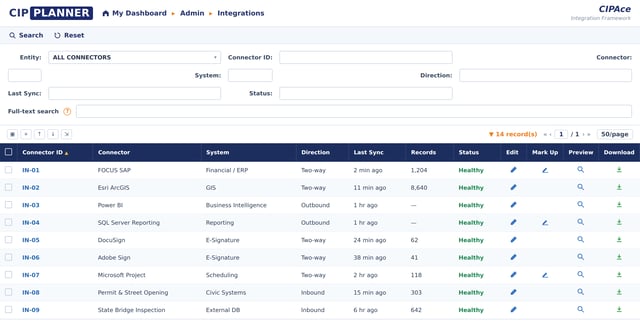
CIPAce™ supports two-way integration through the CIPAce Web API, so financial data connects directly to contracts and budgets and updates flow in both directions.

This keeps projects funded and reconciled rather than drifting between periodic exports.

CIPAce™ has native support for Power BI, SQL Server Reporting Services, and Excel, so analytics are produced in the BI tools your teams already run rather than a closed reporting module.

Robust native import and export keep the underlying data accessible rather than trapped in a proprietary format.

CIPAce™ enables electronic signature within the workflow. The Capital Program Lifecycle Management solution enables Adobe Sign, and Fairfax County uses DocuSign for electronic approvals in production.

Because signing is part of the workflow, the signed record stays linked to the project and its audit trail.

They break when each integration is custom code wired point to point. An upgrade to either system invalidates the custom layer, and the integration has to be rebuilt.

CIPAce™ uses an Integration Framework and the CIPAce Web API, so integrations are configured on a supported framework rather than hand-coded against internal details that change.

Daily synchronization requires a two-way, automated integration. Fairfax County's CIPAce system synchronizes automatically with FOCUS SAP every day, ensuring continuous budget validation, funding accuracy, and financial transparency.

A constant project identifier on each side keeps the capital system and the financial system in step.

A web API is a defined interface that lets other systems read from and write to the platform programmatically. It is what makes a two-way, maintainable integration possible instead of a manual export.

The CIPAce Web API enables two-way integration with third-party software across financial systems, GIS, and other tools.

The two age very differently.

  • Point to point wires two systems together directly, so each connection is custom and each upgrade risks breaking it
  • An integration framework provides a supported, reusable layer for connecting many systems, so integrations are configured rather than hand-coded

CIPAce™ uses an integration framework with the CIPAce Web API, which is why integrations like the daily FOCUS SAP sync hold up over time.

Related

Schedule an Integration Walkthrough

We will map CIPAce to the systems you run today, financial, GIS, BI, and scheduling, and show the framework against your own integration requirements.

Schedule a Demo

Tell us which systems must connect and we will tailor the session to it.